


Where card businesses fall apart · Printing price labels · Tracking B2B deals · Clean books with QuickBooks · Show day and the LCS counter · Why one system wins · FAQ · Get started
The best way to print price labels as a card vendor is to let your inventory system do it. Double Holo Vendor Hub prints price labels automatically from your inventory at current market prices, tracks your B2B deals from first offer to completed deal financials, and syncs your sales into QuickBooks. Scan a slab, get a label; close a deal, get clean books.
The Back Office Is Where Card Businesses Fall Apart
Most card businesses do not fail on sourcing or sales. They stall out in the back office, where labels stop matching reality, deals live only in someone's memory, and the books get rebuilt from scratch once a year under deadline pressure. None of those problems show up on the sales floor until they already cost real money.
The same three failure modes show up at almost every vendor who has not put a system behind them yet:
Handwritten stickers that undersell. A sticker written last month still says last month's price. If the card doubled in the meantime, every sale off that sticker leaves money on the table, and nobody notices until they compare it to a sold listing weeks later.
Deals negotiated across three DM threads. A collection buy gets discussed on Discord, finalized over text, and confirmed with a handshake at a show. There is no single record of what was offered, what was agreed, or what actually got paid, so reconstructing the deal later means digging through three separate conversations.
A year of sales rebuilt from CSVs every April. Come tax season, revenue and fees have to be pulled from every marketplace's export, matched up by hand, and reconciled against a bank statement. It is a multi-day project every single year, and it gets worse as the business grows.
Each of these is a symptom of the same root cause: labels, deals, and books all living apart from inventory instead of reading off it. A sticker written by hand does not know the price changed. A deal tracked in a group chat does not know it is connected to the same inventory the sticker came from. A spreadsheet of sales does not know it needs to match a bank deposit until someone sits down to check.
These problems also get worse together, not separately. A vendor busy chasing down a deal from memory has less time to notice a stale sticker. A vendor rebuilding a year of sales in April has less time to keep deal notes current the rest of the year. The fix is not working harder inside the same manual process, it is a system where labels, deals, and books all read from the same inventory automatically. The rest of this guide covers how Vendor Hub closes that gap, one piece at a time, starting with the sticker on the case.
The Best Way to Print Price Labels as a Card Vendor
The best way to print price labels as a card vendor is to let your inventory system print them for you, not a label maker and a price guide you have to check by hand. A handwritten or manually typed label is only ever as accurate as the last time someone remembered to update it, and on a fast-moving card that can be days out of date by the next show.
The traditional approach, a label maker loaded with a roll of blanks and a price guide open on a second screen, puts the accuracy of every sticker on a person remembering to check the guide and retype the number. That works for a handful of cards. It breaks down fast for a case of a few hundred, where checking and retyping every price by hand before a show eats an entire evening.
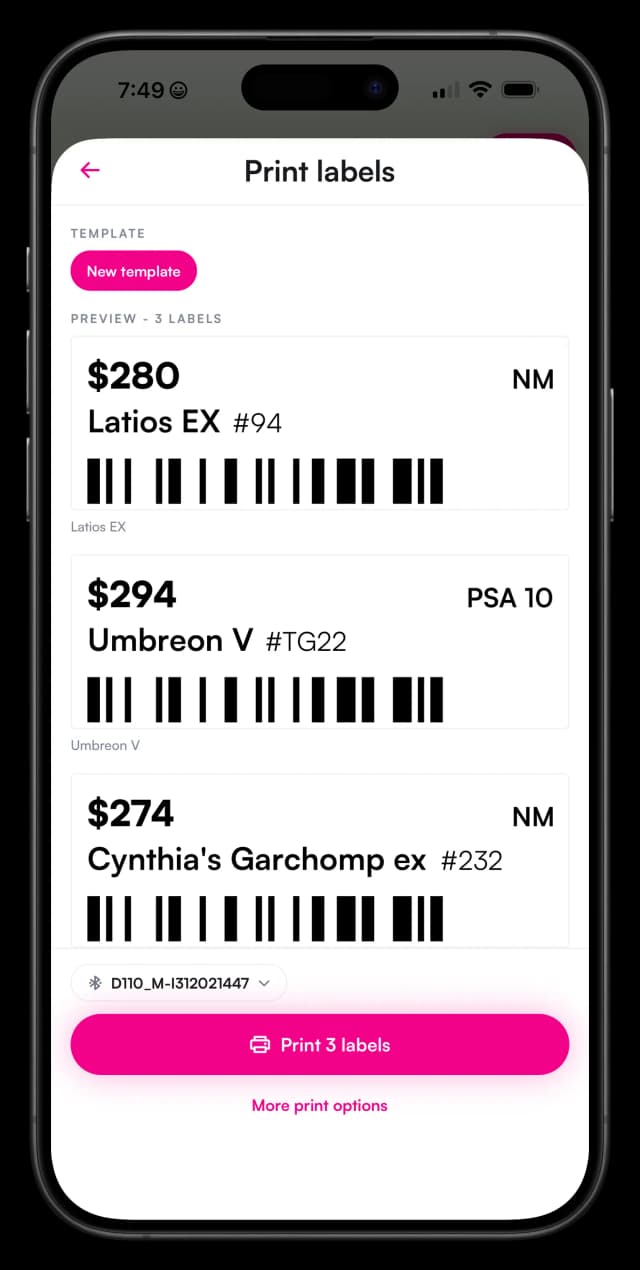
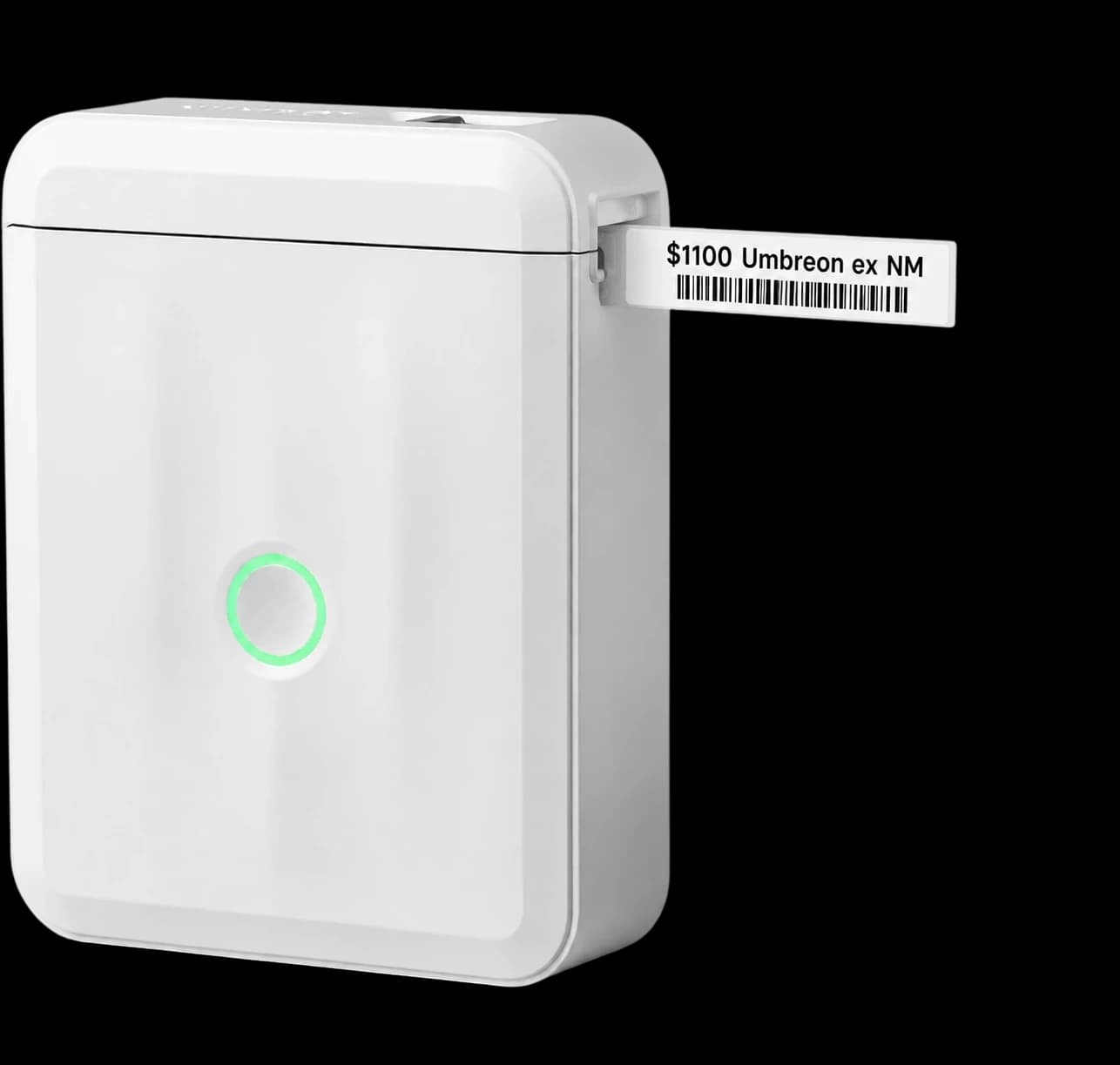
Vendor Hub ties printing directly to the same inventory that powers sync and repricing across every channel you sell on. The workflow is short by design:
- Scan a slab or pick an item in Vendor Hub. There is nothing extra to type in, the card's current inventory record is already there.
- A price label prints with the current market price. The number on the label is pulled from live inventory, not from a price guide printed last month.
- When repricing moves the price, print a fresh label. Reprint before the next show or shift so the sticker never falls behind the number in the app.
Why labels tied to inventory beat handwritten stickers
Three things change once labels come from inventory instead of a person's memory:
- Accuracy. A printed label reflects whatever price is currently in the system. It cannot drift the way a handwritten sticker does, because there is no separate step where a human has to remember to go update it. If the price in Vendor Hub is right, the label is right.
- Speed at setup. Labeling a case the night before a show is a batch print job, not a stack of stickers written by hand one at a time while half-watching TV. The time saved compounds every show, every restock, and every new case added to the shelf.
- Price integrity with customers. A buyer who checks a card online and finds the same price on the sticker trusts the shop more than one who finds the sticker was quietly out of date. Consistent pricing across the counter and the app is a trust signal, not just a convenience.
The result is a case that always matches what is actually in the system, whether that system was updated an hour ago by a sale on eBay or a repricing rule that just moved a card overnight. A vendor never has to choose between running the counter and keeping the case current, because the label already handled it.
The Best Way to Track Deals as a TCG Vendor
The best way to track deals as a TCG vendor is a dedicated deal pipeline, not DMs and memory. Retail sales are simple: a listing, a buyer, a payment. B2B deals are not. They involve back and forth negotiation, a price that shifts before it is agreed, and often a gap of days or weeks between first contact and a completed deal, which is exactly the kind of process a group chat is bad at holding.
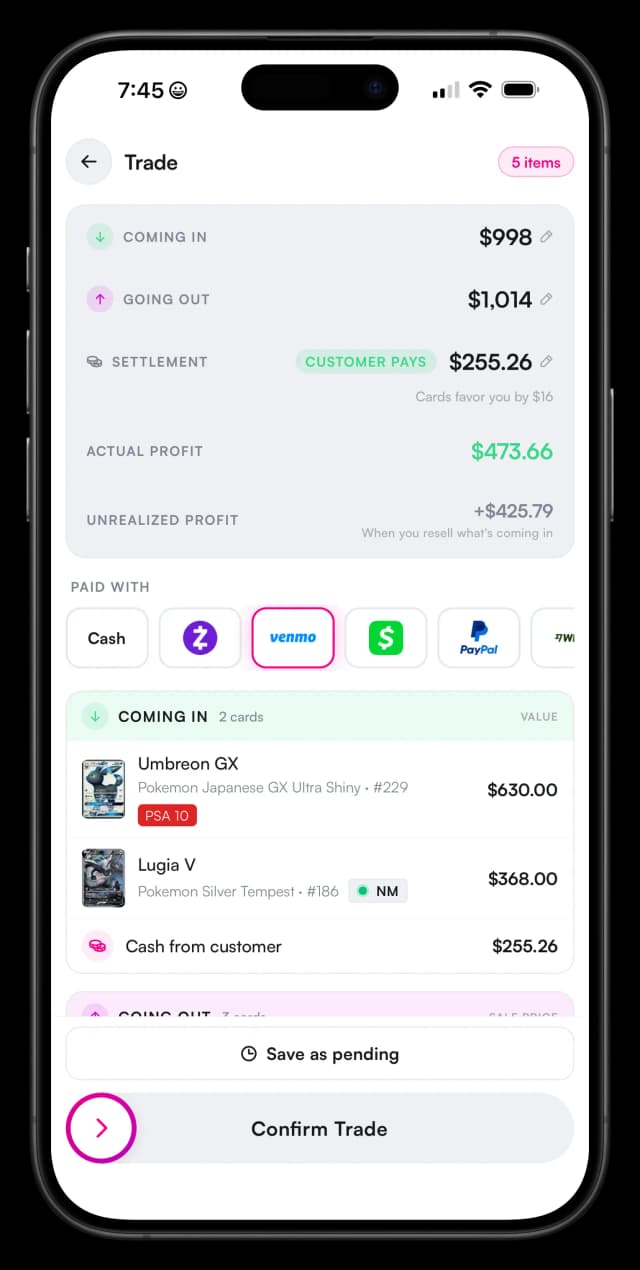
Vendor Hub deal tracking gives every B2B deal, a collection buy, a vendor-to-vendor trade, a bulk move, a single record that follows it from first offer to close. What it covers:
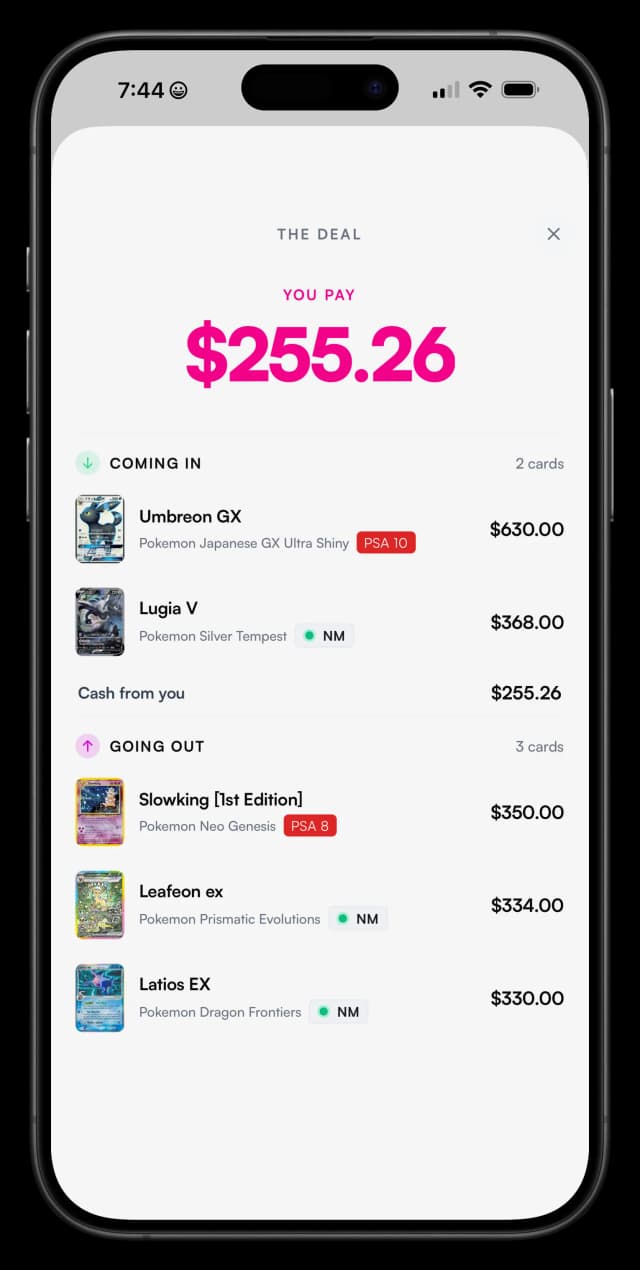
Sourcing and negotiation notes. Keep the context of a deal, who you are dealing with, what was discussed, and what was countered, attached to the deal itself instead of scattered across whichever app the conversation started in.
Agreed prices. Record what was actually agreed, not just the opening offer, so there is no ambiguity about the number both sides settled on when it comes time to pay or get paid.
Deal status. Know at a glance which deals are still being negotiated, which are agreed and waiting to close, and which are done, instead of trying to remember where each conversation left off.
Completed deal financials. Once a deal closes, the financials are attached to it directly, so you know your real margin on every buy instead of estimating it later from a vague memory of what you paid.
B2B deals need different tooling than retail sales because they do not follow the same shape. A retail sale closes the moment a buyer checks out. A collection buy might start with a photo sent over Discord, go through two rounds of counteroffers, and only close a week later once both sides agree on a final number for the whole lot. Trying to track that inside a system built for one-click retail checkout loses the negotiation history and the deal status in between, which is exactly the part that matters most for knowing whether the deal was actually good.
Vendor-to-vendor trades add another layer, since a fair trade often means valuing two very different lots against each other rather than exchanging cards for cash. Bulk moves, clearing overstock to another seller or picking up a large lot at a discount, carry their own back and forth over quantity and price per card. A dedicated deal record holds all of that context in one place, whichever shape the deal takes, instead of forcing every negotiation into a checkout flow it was never designed for.
With a dedicated pipeline, that history stays with the deal permanently. Six months later, a vendor can look back at a completed deal and see exactly what was offered, what was agreed, and what the margin turned out to be, instead of trying to reconstruct it from memory or a deleted DM thread.
Clean Books: QuickBooks for Card Stores and Vendors
Clean books for a card vendor mean sales, fees, and payouts landing in your accounting software as they happen, not reconstructed once a year. Vendor Hub syncs your sales into QuickBooks, so your card business books stay current across the whole year instead of getting rebuilt right before taxes are due.
What syncs is what actually matters for bookkeeping: sales revenue, platform and processing fees, and payouts, flowing into QuickBooks as they occur rather than sitting in a marketplace dashboard until someone goes looking for them. A sale on Double Holo shows up in QuickBooks the way any other sale would, with the fee already broken out as a separate line rather than buried inside a net payout figure.
Marketplace-CSV bookkeeping breaks down for a few predictable reasons. Fees are often already netted out of the export, which hides what was actually charged and makes it easy to under-report expenses. Refunds show up as separate line items that have to be matched back to the original sale by hand. And a vendor selling across multiple channels ends up with a separate CSV per platform, each formatted differently, that all have to be combined into one picture of the business before a bookkeeper can even start. None of that is impossible to do by hand, it is just slow, and slow bookkeeping is bookkeeping that gets pushed off until it becomes a crisis instead of a routine.
When the books were right all year, tax season looks like a review, not a reconstruction. Revenue and fees are already organized in the accounting tool your bookkeeper or accountant expects, and closing out the year is a matter of confirming the numbers rather than assembling them for the first time under a deadline. That difference matters most for vendors who sell across several channels, since accounting software built for cards only has to reconcile what already flowed in cleanly, instead of starting from a pile of exports and a blank spreadsheet.
A card vendor's books are not fundamentally different from any other retail business's books once the data is clean. The hard part was never the accounting itself, it was getting sales data out of several marketplaces and into one place without losing detail along the way. Syncing directly into QuickBooks removes that step entirely.
Show Day and the LCS Counter
Show day and the local card store counter put labels, deals, and inventory under the most pressure, and that is exactly where a system that reads from one inventory pays off the most. There is no time on a busy show floor or a packed Saturday at the shop to double check a price against a phone or dig through a notebook for what a deal was worth. Here is what each workflow looks like with Vendor Hub.
Card show workflow
- Label the case the night before. Batch print labels for everything going in the case, pulled straight from current inventory prices, instead of writing stickers one at a time.
- Reprice and reprint the movers during the show. If a card spikes mid-show, reprint its label on the spot instead of leaving the old price up for the rest of the day.
- Log deals at the table. A collection buy offered across the table goes straight into deal tracking, with the offer and negotiation notes recorded before you have moved on to the next customer.
Local card store workflow
- Staff can trust the sticker. Anyone working the counter can quote the price on the label with confidence, because it came from the same inventory as the online listing, not from a guess or an outdated print run.
- Counter buys go straight into inventory. A customer selling cards over the counter gets logged into Vendor Hub on the spot, ready to be priced and labeled instead of sitting in a box for later.
- End-of-month books are already done. Because sales have been syncing into QuickBooks all month, closing the books is a quick review rather than a rebuild from register tapes and receipts.
Whether the counter is a folding table at a convention center or a glass case in a storefront, the same inventory backs every label, every deal, and every sale, which is what keeps a busy day from turning into a backlog of catch-up work. The Monday after a show, or the first of the month at the shop, becomes a normal day instead of the day everything from the week before finally gets entered into a system.
Why One System Beats Three Apps and a Notebook
One system beats three apps and a notebook because labels, deals, and accounting are only trustworthy when they all read from the same inventory. A label printer that does not know about a deal that just closed, or a spreadsheet that does not know about a price the repricer just moved, is a gap where errors get in. Every separate tool is another place for the truth to drift, and another reconciliation someone has to remember to do.
Vendor Hub keeps the back office connected to the same inventory that handles multi-channel sync and automated repricing. A label prints the same price a customer sees online because it is the same number. A deal's completed financials are accurate because they are attached to the actual inventory that changed hands. The books are current because every sale that touches inventory also touches QuickBooks.
For the full picture of how price labels, deal tracking, and accounting fit alongside sync and repricing in one app, see our guide to the best software for Pokemon card sellers.
What is the best way to print price labels as a card vendor?
Print them from your inventory system instead of writing them by hand. Vendor Hub prints price labels automatically at current market prices: scan a slab or select an item in Vendor Hub and the label prints. When prices move, reprint in bulk before your next show or shift.
What is the best way to track deals as a TCG vendor?
Use a dedicated deal pipeline rather than DMs and memory. Vendor Hub deal tracking records each B2B deal from first offer through completed deal financials, including agreed prices and margin, so you always know what you paid, what you made, and which deals are still open.
Does Vendor Hub integrate with QuickBooks?
Yes. Vendor Hub syncs your sales into QuickBooks so your card business books stay current all year. Instead of reconstructing a year of marketplace CSVs at tax time, your revenue and fees are already organized in the accounting tool your bookkeeper or accountant expects.
Can I use Vendor Hub at card shows?
Yes. Vendor Hub runs in the Double Holo mobile app, which makes it practical on a show floor. Vendors print price labels before setup, reprice and reprint movers during the show, and log collection buys and B2B deals at the table.
How do price labels stay accurate when card prices change?
Labels print from live inventory prices, and automated repricing keeps those prices tracking the market. When a card moves, reprint its label from Vendor Hub. Your sticker price and your online price come from the same system, so they never disagree.
Vendor Hub ships inside the Double Holo mobile app. Download the app, open the Sell tab, and tap Vendor Hub to set up your inventory, connect your channels, and start selling smarter.
- Best Software for Pokemon Card Sellers - the full Vendor Hub software guide.
- Vendor Inventory Management - multi-channel sync and automated repricing.
- Top Pokemon Card Vendor Tips - strategies for pricing, sourcing, and customer service.