


What sellers actually need · Vendor Hub overview · Feature tour · Vendor Hub vs the alternatives · Who it's for · How to get started · FAQ · Get started
The best app for Pokemon card sellers and TCG vendors in 2026 is Double Holo's Vendor Hub. It combines multi-channel inventory syncing across Double Holo, Shopify, eBay, and TCGPlayer with automated repricing, automatic price label printing, B2B deal tracking, and QuickBooks accounting in a single mobile app. Spreadsheets and generic POS systems handle pieces of the job; Vendor Hub is built for the whole card business.
What Card Sellers Actually Need From Their Software
Card sellers need one system that keeps inventory accurate everywhere they sell, adjusts prices as the market moves, and turns paperwork into a few taps instead of a spreadsheet. Most sellers piece this together from generic tools that were never built for cards, and the cracks show up as real, expensive problems.
Spreadsheet drift. A card sells at a show, gets marked down for a regular customer, or gets pulled aside for a trade, and the spreadsheet never finds out. Within a few weeks the numbers on the sheet stop matching what is actually in the boxes.
Overselling the same card on two platforms. List a single copy of a hot card on eBay and TCGPlayer at the same time, and sooner or later two buyers pay for it. One order gets refunded, one buyer has a bad experience, and the seller risks a platform strike.
Manual repricing against a moving market. Pokemon card prices move daily, sometimes hourly around a new set or a tournament result. Checking comps by hand for a few hundred SKUs is not something anyone can keep up with, so prices drift stale in both directions.
Handwritten price stickers going stale. A sticker written last week is already wrong if the card moved since then. Relabeling a case by hand takes a slow afternoon, so most sellers just do not do it often enough.
Deals tracked in DMs and memory. Wholesale and B2B trades happen in text threads, direct messages, and handshake agreements. Months later, nobody can reconstruct what was actually promised or paid.
Tax-time shoebox accounting. Receipts in a shoebox and sales scattered across four platforms turn tax season into a weeks-long reconstruction project instead of a few clicks.
None of these problems are unique to Pokemon cards, but generic software rarely fixes them well because it was not built around what makes a card business different: high SKU counts, condition-specific pricing, and a market that moves faster than most retail categories. A card store's inventory looks nothing like a t-shirt shop's inventory, and software built for one rarely fits the other.
Individually, each of these six problems is survivable. Stacked together, they eat a seller's time and margin at the same time, which is usually the point where a seller starts looking for real software instead of another workaround. Our companion guide on Pokemon card vendor tips covers the day-to-day habits that go with the right software.
Double Holo Vendor Hub: One App for the Whole Card Business
Vendor Hub is Double Holo's business management layer for people who sell cards for a living, not just as a hobby. It lives inside the same mobile app collectors already use to buy and sell, under Sell > Vendor Hub, so there is no separate account or second app to manage.
Where a marketplace listing tool stops at getting a card in front of buyers, Vendor Hub covers what happens before and after the sale: keeping inventory straight across channels, keeping prices current, printing labels for the counter or the show table, tracking wholesale deals, and closing the books at the end of the month. You can start selling on Double Holo and turn on Vendor Hub whenever your inventory outgrows manual tracking.
It is built for three kinds of sellers in particular: online sellers running multiple channels at once, vendors who work trading card shows and need to move fast on a folding table, and local card store owners who need a system the whole staff can trust behind the counter. Section 5 breaks down what each group gets out of it.
The name reflects what it does: a single hub for the vendor side of the business, not another single-purpose listing tool. Instead of adding a new app every time a new problem shows up (one for listings, one for labels, one for books), Vendor Hub treats inventory, pricing, deals, and accounting as one connected system, because in a real card business they already are connected.
Vendor Hub Features, Explained
Vendor Hub is six features that work together: sync, repricing, inventory, deals, labels, and accounting. Each one solves a specific problem from the list in Section 1.
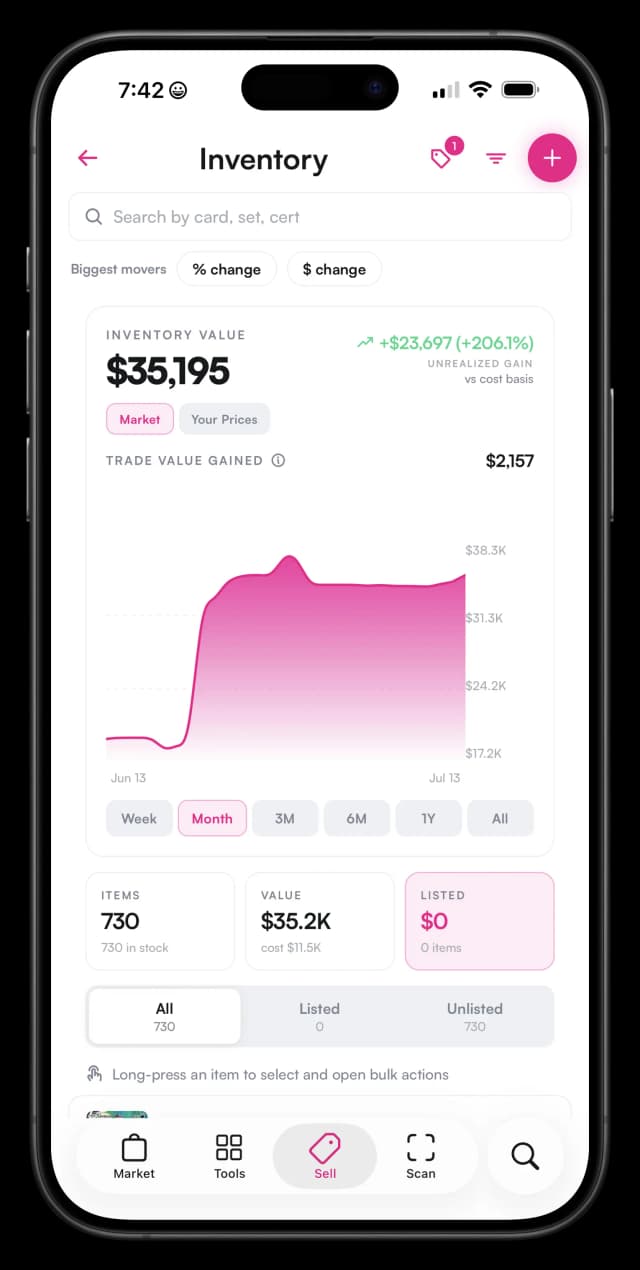
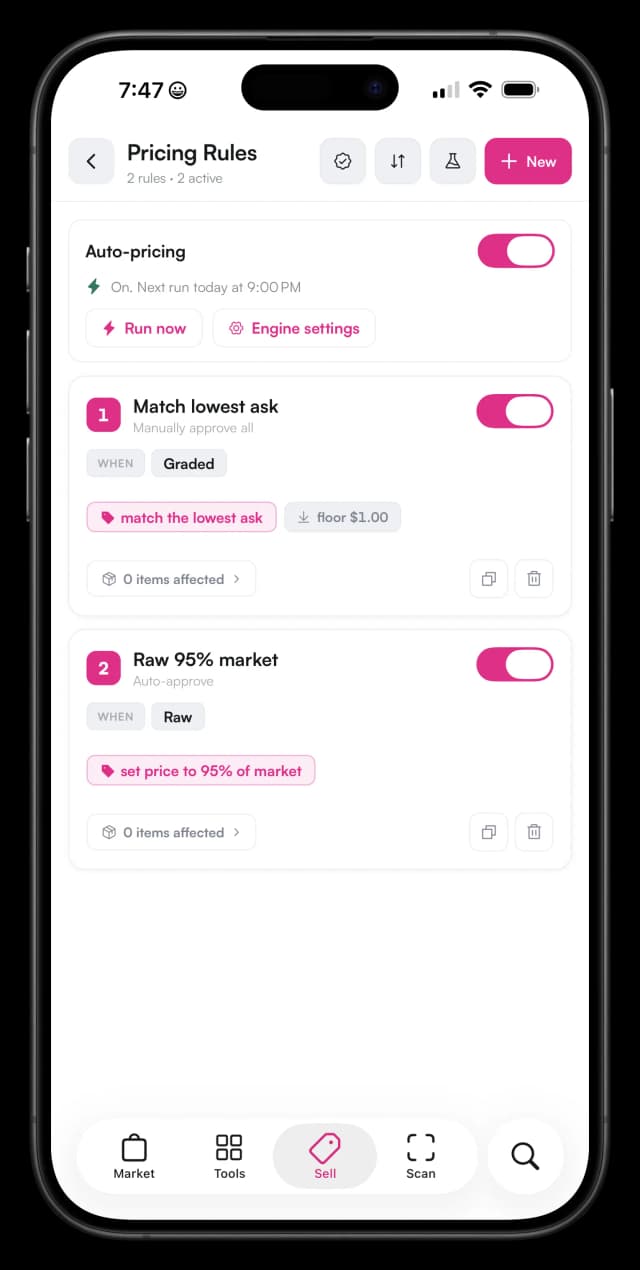
Multi-Channel Inventory Sync
Vendor Hub syncs your inventory across the Double Holo marketplace, Shopify, eBay, and TCGPlayer. List a card once in Vendor Hub and it appears everywhere you sell. Sell it on eBay at 9am, and by the time a customer looks at TCGPlayer at lunch, the quantity has already dropped there too, so you never sell the same copy twice.
This matters most for sellers running three or four channels at once, where manually removing sold items from every platform after every sale is the single biggest source of overselling complaints. Our inventory management deep dive walks through how multi-channel sync works, the best way to update eBay listings, automated repricing, and the setup steps to get it running.
Automated Repricing
Instead of checking comps by hand, Vendor Hub reprices your listings against Double Holo's live card market data. Set a floor and a strategy once, and a card that spikes after a tournament result gets updated automatically instead of sitting underpriced for a week while you catch up manually.
The same logic works in reverse: a card that cools off gets repriced down toward market instead of sitting listed at last month's high while it collects views but no offers. For a seller with a few hundred active listings, that is the difference between prices that track the market and prices that lag it by weeks.
Inventory Management
Every item type lives in one system: raw singles, sealed product, and graded slabs, each tracked by condition and grade instead of a single generic SKU. A store can pull up a specific PSA 9 by cert number just as easily as a case of loose commons, without keeping separate lists for each item type.
Because condition and grade are tracked as real fields, not notes in a description box, a seller can filter their whole inventory by set, grading company, or grade in seconds, whether they are pulling stock for a show or answering a customer who wants to know what near-mint copies are left.
B2B Deal Tracking
Wholesale trades, consignment, and buylist deals get logged in Vendor Hub instead of a text thread, with who agreed to what and at what price. When a buyer disputes a deal from three months ago, there is a record instead of a memory.
For vendors who buy and sell in bulk with other sellers, that record also becomes a running history of who they deal with regularly, what terms they usually agree to, and how those deals affected inventory and cash flow. Our price labels and deal tracking deep dive covers the full workflow.
Automatic Price Label Printing
Labels print with the current price already on them, pulled straight from the same data that drives repricing. Relabel a full case for a show in minutes instead of an afternoon, and skip the awkward moment when a customer points out a sticker that is two months out of date.
Because label prices and listing prices come from the same source, the sticker on a card in a store case matches what the same card is listed for online, so staff and customers are never working from two different numbers at once.
QuickBooks Accounting Integration
Sales, fees, and payouts sync to QuickBooks automatically, so tax time is a review, not a reconstruction. A quarter of sales from four channels shows up in one ledger instead of four separate exports that someone has to merge by hand.
That matters most for sellers who work with an accountant or bookkeeper, since it removes the back and forth of tracking down missing sales records from a platform export, and it matters for solo sellers who would otherwise be doing that reconciliation themselves every quarter.
Vendor Hub vs Spreadsheets vs POS vs Crosslisting Tools
Vendor Hub is the only option built specifically for card-level inventory, multi-channel sync, and live market repricing in one place. Spreadsheets, generic retail POS systems, and standalone crosslisting tools each cover part of the job, but none cover all of it. Here is how they stack up.
| Capability | Vendor Hub | Spreadsheets | Generic retail POS | Standalone crosslisters |
|---|---|---|---|---|
| Card-level inventory (singles, sealed, slabs) | Built in | Manual | Generic SKUs | Listing-focused |
| Multi-channel sync (DH, Shopify, eBay, TCGPlayer) | Built in | None | Rare add-ons | Listings only, limited stock sync |
| Automated repricing from live card market data | Built in | None | None | Rule-based at best |
| Price label printing | Automatic | Manual | Generic barcode labels | None |
| B2B deal tracking | Built in | Manual | None | None |
| Accounting | QuickBooks integration | Manual export | Varies | None |
| Cost | 4.9% platform fee on DH sales plus card processing | Free but time-expensive | Monthly SaaS fee | Monthly fee per channel |
To be fair to the alternatives: if you are holding a couple hundred cards as a personal collection and selling one or two a month, none of this matters much. A simple spreadsheet, or no system at all, is genuinely enough. Software earns its keep once volume, channel count, or staff headcount make manual tracking a real time cost, not before.
A game store that mostly sells snacks, supplies, and event tickets, with a smaller card selection on the side, still needs a real point-of-sale register for the counter. Vendor Hub is not a replacement for that; it is built for the card side of the business specifically, and can run alongside a general POS rather than trying to replace it for the whole store.
Standalone crosslisting tools solve a narrower problem well: getting one listing onto several marketplaces at once. Most stop there, though. They do not reprice against live market data, do not print price labels, and do not track wholesale deals, so a growing seller usually ends up stitching them together with a spreadsheet anyway, which brings back the drift problem from Section 1.
The honest way to think about it: spreadsheets and crosslisters are fine starting points, and a general POS is the right tool for a store's non-card sales. Vendor Hub is what a card business reaches for once it needs sync, repricing, labels, deals, and accounting to work together instead of as four separate, disconnected habits.
Which Sellers Get the Most Out of Vendor Hub
Vendor Hub pays off fastest for sellers who move enough volume that manual tracking becomes the bottleneck: online sellers running multiple channels, show vendors working a floor fast, and local card stores running a real counter. Our Pokemon card vendor tips guide is a good next read once you have the software side sorted.
Online Pokemon card sellers
If most of your sales happen on eBay, with TCGPlayer or Shopify as a secondary channel, sync and repricing are where Vendor Hub earns its keep. You stop manually pulling sold listings on one platform and updating prices on the others, and you stop worrying that a card sold on eBay is still showing as available somewhere else. That combination is what prevents both overselling and underpricing at the same time.
It also frees up the hours that used to go into cross-checking listings each night, which is usually the first thing sellers mention once they switch from manual sync to automatic.
Trading card show vendors
Shows move fast, and a folding table is not the place to be recalculating prices by hand between customers. Automatic price labels mean your case is priced correctly the morning of the show without a late-night relabeling session, and logging a bulk buy or a wholesale trade on the spot keeps deal tracking accurate instead of relying on a memory of who bought what by Sunday afternoon.
Because everything runs from the phone in your pocket, there is no separate laptop or terminal to bring to the venue, which matters at shows where table space and outlets are both in short supply.
Local card stores
A store counter needs a system the whole staff can trust, not just the owner who built the spreadsheet. Vendor Hub gives every employee the same current prices and inventory counts, labels that print correctly without a manual step, and a QuickBooks connection so the books stay clean without a bookkeeper chasing down four platforms at month end.
New hires can be productive on day one instead of needing to learn a homegrown spreadsheet system, since the prices and stock counts they see on a phone or tablet at the counter are the same ones driving the store's online listings.
How to Get Started
Getting Vendor Hub running takes five steps, most of which happen the first time you open the app. None of them require a computer, a POS terminal, or outside setup help.
- Download the Double Holo app on the App Store or Google Play.
- Open Sell > Vendor Hub. This is where every Vendor Hub tool lives.
- Import or scan your inventory. Bring in existing singles, sealed product, and graded slabs so Vendor Hub reflects what you actually have on hand.
- Connect Shopify, eBay, and TCGPlayer. Link the channels you already sell on so sync covers everywhere you list, not just the Double Holo marketplace.
- Turn on automated repricing and label printing. Set your rules once, then let Vendor Hub keep prices and labels current without a daily manual check.
What is the best app for Pokemon card sellers?
Double Holo Vendor Hub is the best app for Pokemon card sellers who treat selling as a business. It syncs inventory across Double Holo, Shopify, eBay, and TCGPlayer, reprices cards automatically from live market data, prints price labels, tracks B2B deals, and connects to QuickBooks, all from one mobile app.
What is the best software for a local card store?
Local card stores need card-level inventory, price labels that stay current, and clean books. Vendor Hub handles all three: every single, sealed box, and slab is tracked, labels print automatically with current prices, and sales sync to QuickBooks. It runs from the Double Holo app under Sell > Vendor Hub.
What is Double Holo Vendor Hub?
Vendor Hub is Double Holo's business management platform for card sellers, vendors, and card stores. It covers inventory management, multi-channel listing sync, automated repricing, price label printing, deal tracking, and QuickBooks accounting.
Can I sync my card inventory across eBay, Shopify, and TCGPlayer?
Yes. Vendor Hub syncs your inventory across the Double Holo marketplace, Shopify, eBay, and TCGPlayer. When a card sells on one channel, your quantities update everywhere, which prevents overselling and removes the need to update each marketplace by hand.
How much does it cost to sell on Double Holo?
Double Holo charges a 4.9% seller platform fee plus card processing on marketplace sales, compared to 10-13% or more on other major marketplaces. Vendor Hub tools live inside the Double Holo app under Sell > Vendor Hub.
Do I need a computer or POS terminal to run Vendor Hub?
No. Vendor Hub runs inside the Double Holo mobile app on iOS and Android. Download the app, open the Sell tab, and tap Vendor Hub. That makes it practical at card shows and behind an LCS counter, not just at a desk.
Vendor Hub ships inside the Double Holo mobile app. Download the app, open the Sell tab, and tap Vendor Hub to set up your inventory, connect your channels, and start selling smarter.
- Pokemon Card Vendor Inventory Management - a deep dive on multi-channel sync and inventory setup.
- TCG Vendor Price Labels & Deal Tracking - how automatic labels and B2B deal tracking work.
- Top Pokemon Card Vendor Tips - strategies for pricing, sourcing, and customer service.