


Why inventory breaks · One inventory, every channel · Updating eBay listings · Automated repricing · A vendor's day with Vendor Hub · Setting up sync · FAQ · Get started
The best way to track inventory as a Pokemon card vendor is a single system of record that syncs to every channel you sell on. Double Holo Vendor Hub keeps one inventory for your singles, sealed product, and slabs, syncs quantities across Double Holo, Shopify, eBay, and TCGPlayer, and reprices listings automatically from live market data, so you never oversell and never leave stale prices up.
Why Card Inventory Breaks: Spreadsheets, Overselling, and Stale Listings
Card inventory breaks down for three predictable reasons: spreadsheets drift out of sync with what is actually in the boxes, the same card gets sold on two channels at once, and prices on old listings stop tracking the market. Each one costs real money, and the second one costs real customers.
Spreadsheet drift
A spreadsheet is only as accurate as the last person who remembered to update it. The sheet says three copies of a card are in stock. The binder has two, because one sold at a show last weekend and nobody opened the file to change the count. A few weeks of this and the spreadsheet stops being a source of truth and becomes a rough guess that needs to be double-checked by hand before every sale, which defeats the point of keeping a spreadsheet in the first place.
The drift gets worse as the business grows. One seller with a few hundred cards can usually keep a mental model of what is real and what is stale. A seller with a few thousand SKUs across singles, sealed product, and slabs cannot, and every gap between the sheet and the shelf becomes a customer service problem waiting to happen.
Overselling across channels
Overselling happens when the same physical card is listed on more than one marketplace and both listings think they have a copy to sell. A graded slab goes up on eBay and on Double Holo at the same time. It sells on eBay at 9am. If nothing tells the Double Holo listing to come down, a second buyer can check out on a card that no longer exists an hour later.
The fix after the fact is always the same: apologize, refund the second buyer, and hope they do not leave negative feedback. That works once. Vendors who oversell repeatedly build a reputation for it, and repeated cancellations can trigger account reviews on the marketplaces they sell through. Prevention is cheaper than damage control every time.
Stale eBay listings
Pokemon card prices move on tournament results, set releases, grading population reports, and social media hype, sometimes within a single day. A listing priced correctly last month can drift well off the market by this month, in either direction. Underpriced listings sell fast and leave money on the table. Overpriced listings sit for weeks collecting views but no offers, quietly hurting a seller's search ranking on top of the lost sale. Checking and repricing hundreds of listings by hand, across multiple marketplaces, is not something anyone can keep up with for long.
These three problems compound each other. A seller fighting spreadsheet drift has less time to catch stale prices. A seller busy chasing stale prices has less time to double-check quantities before a show. None of them are solved by working harder inside the same manual process, because the process itself is the bottleneck. The fix is a system that keeps the count and the price current on its own, which is exactly what multi-channel sync and automated repricing are built to do, covered next.
One Inventory, Every Channel: How Multi-Channel Sync Works
Multi-channel sync works by giving every marketplace the same live view of one inventory, instead of letting each platform keep its own separate count. Vendor Hub is that one inventory, and it is the reason a sale on any connected channel shows up everywhere else within moments.
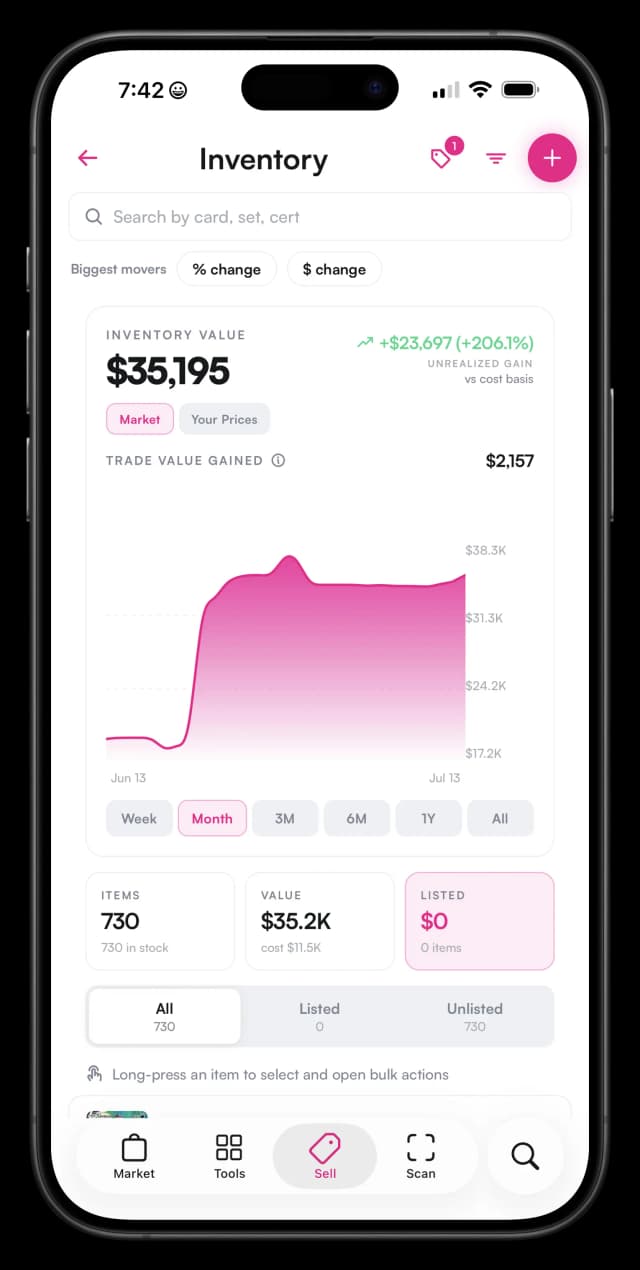
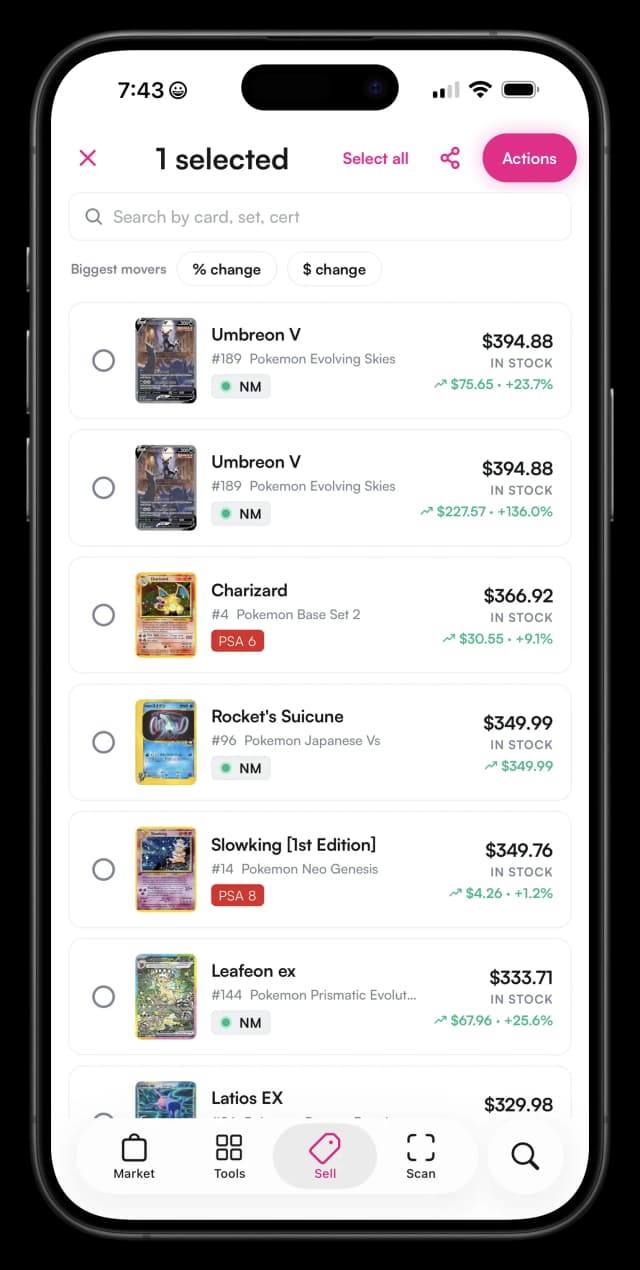
The alternative to a single source of truth is what most growing vendors already do without meaning to: a count on eBay, a count on TCGPlayer, a count on Shopify, and a count in a spreadsheet, each updated on its own schedule and each slightly different from the others by the time a customer clicks buy. A single inventory removes the question of which count is correct, because there is only one, and every channel reads from it directly instead of keeping its own copy.
Under the hood, Vendor Hub models inventory the way a real card business actually holds it, not as generic retail SKUs. Raw singles, sealed product, and graded slabs are each tracked at the card level, with condition, grading company, and grade as real fields rather than notes buried in a listing description. Look up one PSA 9 by its cert number or an entire case of commons by set and quantity, both live in the same system, and every item type feeds the same sync, repricing, and label tools described later in this guide. That matters for vendors who carry a mix of item types, since a graded slab, a sealed booster box, and a loose common all need to sync the same way even though they are priced and handled very differently on the shelf.
The day-to-day flow is simple by design:
- List once in Vendor Hub. Enter the card, condition, and price a single time instead of building the same listing on every marketplace separately.
- Push to connected channels. Vendor Hub publishes the listing to the Double Holo marketplace and to any of Shopify, eBay, and TCGPlayer you have connected.
- A sale anywhere decrements everywhere. Sell the card on eBay, and the quantity drops on Shopify, TCGPlayer, and Double Holo at the same time, without you touching another listing.
That flow is what turns four separate inventories into one. It also means adding a new channel later, say a vendor who has only sold on the Double Holo marketplace decides to add TCGPlayer, does not mean rebuilding an inventory from scratch. The existing Vendor Hub inventory just gets one more destination to push to.
For the full picture of what Vendor Hub replaces and how it compares to spreadsheets and generic point-of-sale software, see our guide to the best software for Pokemon card sellers.
The Best Way to Update eBay Listings as a Card Seller
The best way to update eBay listings as a card seller is to stop editing them one at a time and let an inventory system push quantity and price changes for you. Manual editing does not scale past a handful of active listings, and every listing you forget to touch is a listing quietly drifting out of date.
eBay's own bulk-edit tools help, but they are still a manual workflow: you select listings, apply a change, and repeat the process the next time prices move or stock changes. That works for a one-time cleanup. It does not work as a daily habit for a seller managing hundreds of SKUs across multiple channels, because someone still has to notice the market moved and go start the bulk edit.
Sync-driven updates flip the order of operations. Instead of a person deciding when to open eBay and update listings as a card seller, Vendor Hub treats eBay as one more connected channel that receives changes automatically whenever your Vendor Hub inventory changes. A card sells on Double Holo, and the eBay listing's quantity drops without you opening eBay at all. A repricing rule adjusts a card's price, and the eBay listing updates along with every other connected channel.
This is a bigger deal for eBay specifically than for most other channels, because eBay is usually where a vendor's oldest and highest-volume listings live. A seller who has been on eBay for years often has hundreds of active listings built up over time, which makes eBay the single most expensive channel to keep current by hand and the one where sync pays for itself fastest. Connecting eBay to Vendor Hub once replaces what would otherwise be a recurring weekly chore for as long as those listings stay active.
The practical result is that eBay listings stop being something you maintain and start being something that maintains itself. Sold-out cards close on their own, prices track the market without a manual check-in, and the hours that used to go into updating eBay listings as a card seller go back into sourcing and pricing decisions that actually need a person.
Automated Repricing From Live Market Data
Automated repricing works by watching live market data for every card you have listed and adjusting your prices within rules you set, so listings track the market without a manual check every day. Vendor Hub runs this against Double Holo's own market data rather than a generic pricing feed.
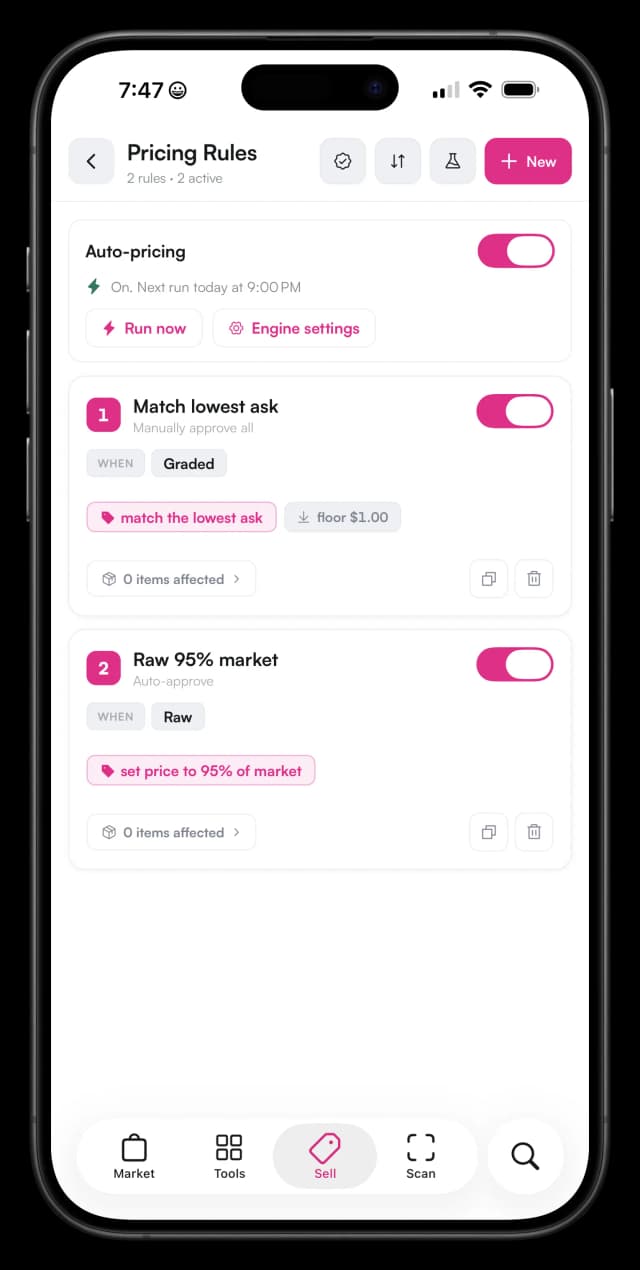
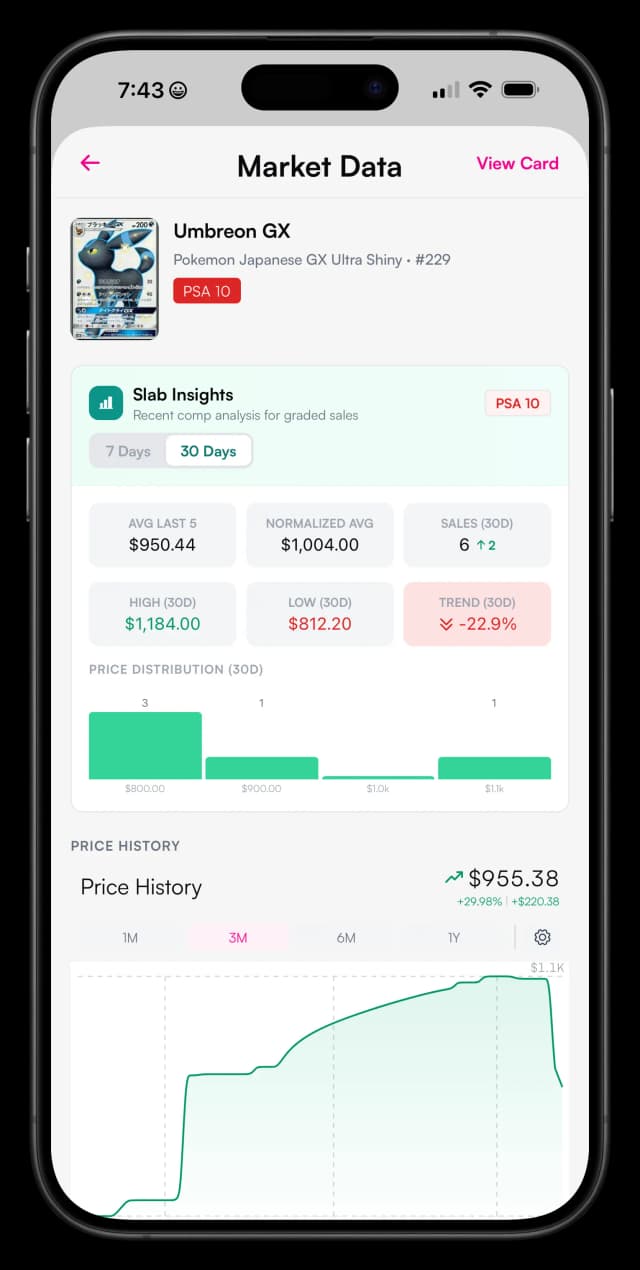
Specifically, the repricer watches Double Holo's order books, recent completed sales, and current market prices for each card in your inventory. When a card's market price moves, whether that is up after a strong pull-rate reveal or down as hype cools, your listing price on every connected channel moves with it, based on the floor and strategy you configured, not a fixed schedule someone has to remember to run.
That distinction matters more for cards than for most retail categories. A generic rule-based repricer, built for something like clearing seasonal apparel, mostly reacts to shelf-life: a product that has not sold in 30 days gets a fixed discount. Card prices do not move on a calendar. They move on pull rates from a new set, grading population reports that make a specific grade suddenly scarcer, tournament results, and hype cycles that can shift a card's value in days. A repricer that only understands time-on-shelf will always be a step behind a market that moves on those signals instead.
Rules exist so automation never means giving up control. A vendor can set a floor below which a card never reprices, so a repricer chasing a temporary dip does not sell a card at a loss during a bad week. A vendor can also choose how aggressively prices should follow the market, matching the lowest comp closely for cards that need to move fast, or staying closer to the top of the range for slower, more patient inventory. The rules stay the same until you change them; only the prices move.
Because Vendor Hub reprices from the same live card market data that powers Double Holo's market intelligence tools, a listing tracks the actual market for that specific card and grade instead of a generic pricing rule that was never built with trading cards in mind. That is the difference between a repricer that understands why a card's value changed and one that only knows a clock is running.
A Vendor's Day With Vendor Hub
A vendor's day with Vendor Hub looks less like manual bookkeeping and more like reviewing work that already happened overnight. There is no dramatic transformation here, just fewer hours spent on tasks that a system can handle on its own. Here is what that looks like in practice.
Morning: Overnight sales on eBay and Double Holo have already decremented the same cards everywhere else, and the repricer moved 14 listing prices overnight to track cards that shifted on the market while everyone was asleep. Nothing to reconcile, just a quick scan of what sold.
Midday: A local collection buyout comes in. Each slab gets scanned into Vendor Hub inventory on the spot, logged with condition and grade instead of a handwritten note to enter later. By the time the seller leaves, the cards are already searchable in inventory, not sitting in a box waiting to be catalogued after hours.
Evening: The new cards from the buyout get priced and pushed to every connected channel at once. Price labels for anything going in the store case print automatically with current prices already on them, covered in our price labels and deal tracking deep dive, so there is no separate relabeling session later in the week.
None of this is dramatic. That is the point. The work that used to eat a couple of hours a day, cross checking listings, updating prices by hand, and writing price stickers, mostly disappears, and what is left is the part of the job that actually requires a person: buying good inventory and deciding what it is worth.
How to Set Up Multi-Channel Sync
Setting up multi-channel sync takes five steps, and most vendors finish all of them the first time they open the app. None of it requires a computer, a developer, or outside setup help, and there is no waiting period before sync starts working.
- Download the Double Holo app and open Sell > Vendor Hub. This is where every Vendor Hub tool lives, on iOS and Android.
- Add your inventory by scanning slabs or importing your list. Bring in what you already have so Vendor Hub reflects your actual stock from day one.
- Connect your Shopify, eBay, and TCGPlayer accounts. Link every channel you already sell on so sync covers all of it, not just the Double Holo marketplace.
- Choose your repricing rules. Set a floor and how aggressively you want prices to follow the market, once.
- Push your listings and let sync take over. From here, sales and price changes stay current across every channel automatically.
That is the whole setup. There is no separate configuration step for each marketplace beyond connecting the account, and there is nothing to reconfigure later if your channel mix changes. Add a channel when you are ready for it, and Vendor Hub starts syncing to it the same way it already syncs to the others.
For a broader look at how sync fits alongside repricing, labels, deal tracking, and accounting as one connected system, our full Vendor Hub software guide covers the rest of what the app does once your inventory is synced.
What is the best way to track inventory as a Pokemon card vendor?
Use one system of record that syncs to every sales channel. Double Holo Vendor Hub tracks singles, sealed product, and graded slabs at the card level and syncs quantities across Double Holo, Shopify, eBay, and TCGPlayer, so a sale on one channel updates all of them automatically.
What is the best way to update eBay listings as a card seller?
Connect eBay to an inventory system instead of editing listings by hand. With Vendor Hub, quantity changes and repricing rules push to eBay automatically, so sold-out cards close and prices track the market without you opening the eBay listing editor at all.
How does automated repricing work for trading cards?
Vendor Hub monitors live market data on Double Holo, including recent sales and the order book, and adjusts your listing prices within rules you set. When the market moves on a card you have listed, your price follows it across every connected channel.
Can multi-channel sync prevent overselling?
Yes. Overselling happens when two marketplaces both think they can sell the same copy. With synced inventory, a sale on any channel immediately decrements your quantity everywhere else, so the second buyer never gets to check out on a card you no longer have.
Does Vendor Hub track sealed product and graded slabs too?
Yes. Vendor Hub inventory covers raw singles, sealed product, and graded slabs. Slabs can be added with the Double Holo slab scanner, and every item type syncs across channels and feeds the same repricing and label printing tools.
How do I set up multi-channel inventory sync?
Download the Double Holo app and open Sell > Vendor Hub. Add inventory by scanning or importing, connect Shopify, eBay, and TCGPlayer, choose repricing rules, and push your listings. From then on, sales and price changes sync automatically.
Vendor Hub ships inside the Double Holo mobile app. Download the app, open the Sell tab, and tap Vendor Hub to set up your inventory, connect your channels, and start selling smarter.
- Best Software for Pokemon Card Sellers - the full Vendor Hub software guide.
- TCG Vendor Price Labels & Deal Tracking - how automatic labels and B2B deal tracking work.
- Top Pokemon Card Vendor Tips - strategies for pricing, sourcing, and customer service.